
Everything you need to stop chasing documents.
Recurring templates, secure client upload portals, a unified review inbox, automated reminders, and audit-ready exports — all connected in one workflow.
Setup in minutes · No client accounts · Cancel anytime
Recurring templates
Build a template once — name it, set a cadence, add the documents you need, and enrol your clients. The system handles sending and re-sending on schedule.
- Five cadences: weekly, monthly, quarterly, semi-annual, annual
- Each document has a name, optional instructions, allowed file types, and can be reordered
- Enrol any number of clients on the same template
- Set a due day override per client to match their billing cycle
- Choose to delay the first send to next month, or send immediately and have the recurring schedule pick up from next month
Chase schedule built in
Each template carries its own pre-due and post-due reminder steps. Configure how many days before and after the deadline to chase — override it per request when a client needs different treatment.
Recurring automation requires Pro or above.
Passwordless client portals
Each request generates a unique, tokenised upload link. Clients click it and land directly in their portal — no account to create, no password to remember, no app to download. The link is scoped to that client and that request only.
- Portal shows your name and company so clients know who sent it
- Each document is listed with its name, instructions, and accepted formats
- Accepts PDF, Word, Excel, and image files — configured per document
- File size limits apply per plan (2 MB on Free, 10 MB on Trial, 25 MB on Pro, 100 MB on Business)
- Click to upload or drag-and-drop; preview thumbnail confirms the file
- Remove and re-upload any file before submitting
- Footer progress bar shows how many documents are still outstanding
The email that starts it all
Clients receive a clean, branded email showing your name and company. A single button takes them straight to their upload portal — no login screen, no friction. The link is scoped to that client and that request only — once submitted, the portal shows a completion screen and no further uploads can be made.
See exactly what your clients see
From Settings, send yourself a live preview portal at any time. It opens a real upload session at your current configuration — confirm everything looks right before your first send goes out.
Documents requested — Action required
from noreply@actis-docs.com
Review inbox
Every upload lands in one place. Open a session, review each file in-app, and approve or deny without leaving the page. Three views keep different stages of the document lifecycle separate.
Pending review
All open submission sessions — requests that have been sent and are currently active. Filter by Awaiting review to see only sessions with unreviewed uploads, Overdue for past-due sessions, or Due soon to get ahead of upcoming deadlines. Approve or deny each file individually — denials require a reason that is shown to the client in the re-request email.
Approved
Files you have already reviewed and approved, sorted by expiry date so the ones closest to deletion surface first. Approved files are kept for a set window then automatically deleted — download them here before they are gone.
Lapsing
An urgent attention list: approved files that have not been downloaded and expire within 72 hours. Grouped by session with a file count and soonest expiry time per group. If something is in here, download it now or it will be permanently deleted.
Every email, accounted for
Initial sends, reminders, re-requests, and notifications — all configurable, all logged, all automatic.
Chase schedule
Set pre-due and post-due reminder steps at the template level. Override the schedule for individual requests when a client needs different treatment. Chase defaults apply automatically to every new template and one-time request.
Scheduled sends
Templates fire automatically on their configured cadence. No manual triggering — the system sends the initial request and all follow-ups according to the schedule you set at enrolment.
Email outbox
See a full record of every email sent: initial requests, reminders, re-requests, and confirmations — with timestamps. Know exactly what your client received and when, without needing to check your own inbox.
Advisor notifications
When a client uploads, the bell icon in the header alerts you to new pending review sessions. It also surfaces unanswered sessions and lapsing files. Separate usage warnings appear when you approach or reach the cap on emails, clients, requests, or storage.
Clients & requests
Start with a single request — no template required. Add recurring templates when the pattern is established.
One-time requests
Send a manual request to any client at any time — no template required. Choose the documents, set a due date (timezone follows the client's settings), configure a chase schedule, and send. The same portal and review workflow applies.
Create and edit clients
Each client has a name and an optional email address. The email is what enables sending upload links. Set a default due day of month and timezone so deadlines are always calculated in the client's local time.
Per-client enrollment
Enrol a client in any template by toggling the enrollment switch. Set a due day override for that client to diverge from the template default — useful when different clients have different billing cycles.
Archive and restore
Archive inactive clients so they disappear from your active list without losing any history. Restore them at any time from the Archived view — all prior sessions and documents are preserved.
Your workspace at a glance
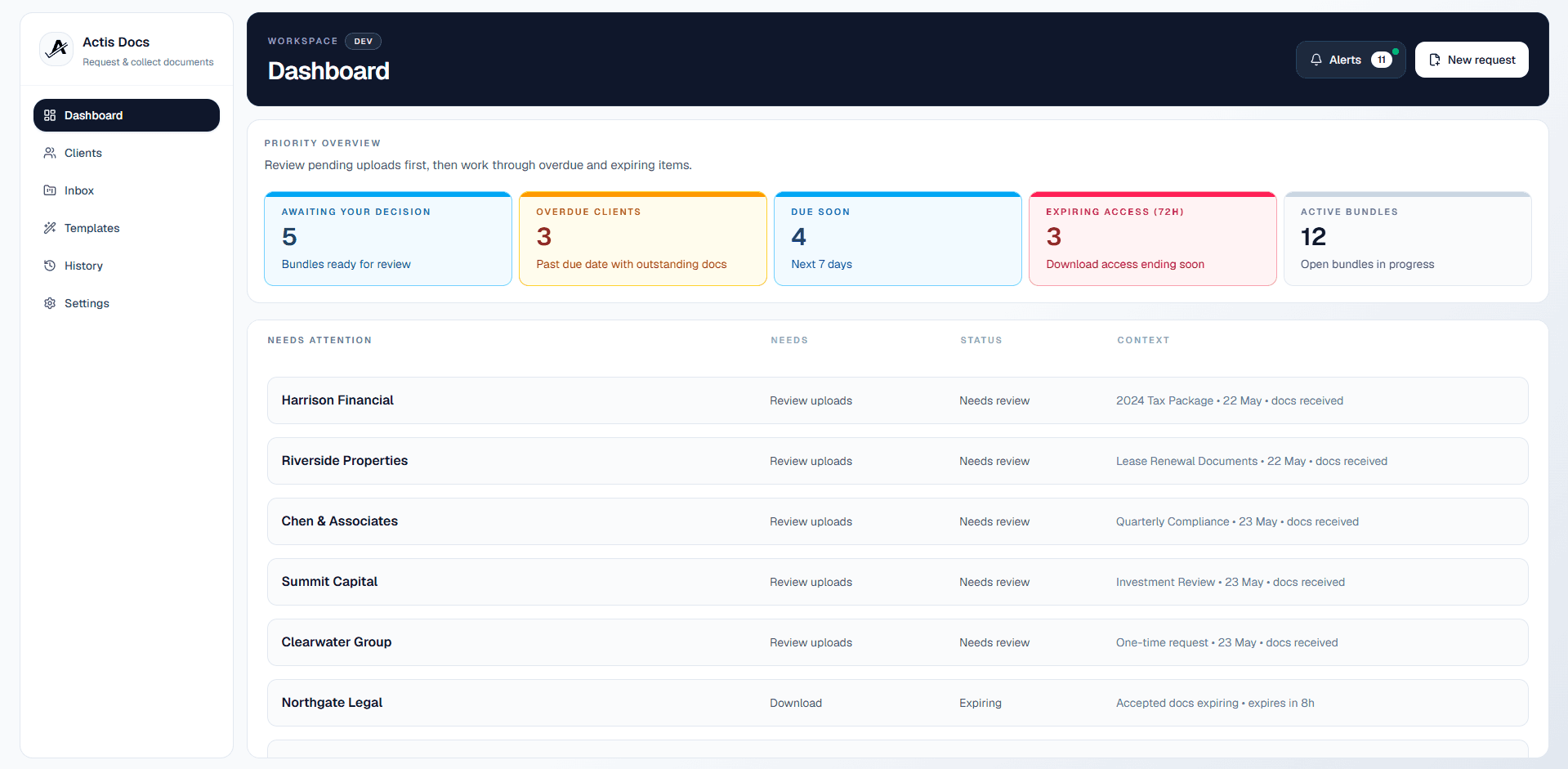
The dashboard opens on a KPI strip showing total clients, active requests, pending review count, and storage used. Below it, a Needs Attention section surfaces sessions that require action — click any item to go directly to it.
- Pending review: new uploads waiting for your approval
- Lapsing files: approved documents due for recollection
- Unanswered sessions: clients who submitted nothing 21 days past due
History & exports
The History view shows all completed, expired, unanswered, and cancelled sessions. Filter by client, sort by date, and click any row to see the full document list. Download a complete, uniformly named document set for any closed session — clean and consistent every time.
Set once, applied everywhere
Configure your name, timezone, and chase defaults once. Every template, request, and client email inherits them automatically.
General settings
Your name and company name appear in every client email and in the upload portal ("Requested by …"). Timezone governs all cron scheduling and due date calculations. Date format (DD/MM/YYYY or MM/DD/YYYY) and default due days pre-fill new requests.
Chase schedule defaults
Define your standard pre-due and post-due reminder steps once in Settings. Every new template and one-time request inherits these defaults — override them per template or per request when a client needs different treatment.
Usage tracking
The Usage page shows emails sent so far this month with a progress bar, projected emails based on active templates and enrolled clients, a per-template breakdown of initial sends vs chase emails, and a top saving opportunity if you are approaching the cap.
Billing
The Billing card shows your current plan, status, and paid-until date. Manage subscription links to your Paystack customer portal to update billing details or cancel. See all plans links to the pricing page.
Secure by design
Access controls, isolated workspaces, and one-way upload flows — built in from the start, not bolted on.
Protected app access
Authenticated routes are guarded server-side and via middleware — every user only ever sees their own workspace and data.
Isolated data access
All queries are scoped by user ownership — data is cleanly separated between accounts so nothing leaks across boundaries.
Rate-limited endpoints
Sensitive API routes are throttled to reduce abuse on token checks, uploads, and public portal routes.
One-way upload portals
Clients submit documents through secure, scoped links. Once uploaded, documents live in your workspace — clients have no way to retrieve or view them after submission.
No client accounts
Clients access via secure upload links only — no passwords or accounts to create, manage, or compromise.
Compliance-ready exports
Uniform file naming and structured workflow states make exported document sets clean, consistent, and easy to present for audit or compliance review.
Ready to try it?
Start your free trial with full access — 10 clients, 10 requests, 3 templates. No credit card required.
Setup in minutes · Cancel any time